
 Are you confused by the jargon? Unsure of what your boss or professor is talking about? Do you feel inadequate at meetings?
Then you need Instructional Design Guru, the smartphone app that puts the information you need at your fingertips.
Instructional Design Guru defines over 470 key terms for instructional designers. And that’s not all! You’ll start making mental connections, because it hyperlinks to related terms so you can continue to learn and deepen your understanding as you use it. One enthusiastic user said, “It makes me look smart!”
Gain Competence
New to instructional design? Instructional Design Guru can make you more competent at doing your job or your classwork. It enhances your knowledge of instructional design and related fields. It clarifies the fuzzy edges of your understanding. You’ll also get tips, here and there, from someone who’s been practicing in the field for over 20 years.
Experienced instructional designer? If you consistently need to look things up—like Bloom’s Taxonomy or multimedia terms—Instructional Design Guru will save you time, even if you’re experienced. That’s because it’s both a reference and performance support app.
Understand Many Fields
Instructional Design is complex and overlaps with many fields. That’s why Instructional Design Guru defines terms from Instructional Design, Cognitive Psychology, Social Media, Multimedia, Technology and Law. See more detail in Google Play.
Easy To Use
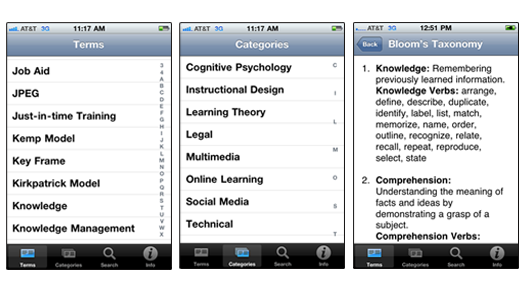
When you tap on a term, the definition displays. Terms have hyperlinks to related terms. Tap on the hyperlink to get its definition. A little light bulb icon in a definition indicates a practical tip. Trouble reading on a phone? Just pinch open the text to enlarge its size and pinch closed to shrink the text size.
Five different ways to get definitions:
- Thumb scroll through all 471 terms in the list and tap one. (Good for browsing to see what’s there.)
- Tap the first letter of a term from the alphabetical index on the right of the screen. (This is the quick way).
- Tap the Category icon in the toolbar to browse terms by category (it’s fun to look through the six categories that are listed in this order: Cognitive Psychology, Instructional Design, Learning Theory, Legal, Multimedia, Social Media and Technical).
- Tap a hyperlink to a related term. (Related terms are hyperlinked because that’s how our brains work).
- Tap the Search icon in the toolbar. Then type a term in the Search box and tap the blue Search button. (This is the other quick way.)
What They’re Saying
“What a great resource!” … Cammy Bean
“I don’t know about you, but I’m always rustling through my bookshelves trying to remember which book explained a term or theory. Now it’s at my fingertips.” … Christine Martell, VisualsSpeak
“Makes me look smart!” … from an iTunes review
“As a PhD student in an instructional design program and an iPhone junkie, I searched for helpful apps and downloaded the Instructional Design Guru. I use it daily! Thanks for filling the void.” … KC Lewis
Is it for me?
Junior instructional designers as well as students benefit the most from Instructional Design Guru. But experienced instructional designers, educators and educational technologists also use it because it provides performance support. If you need to look up concepts and terms, like verbs from Bloom’s Taxonomy, copyright definitions or video formats then you’ll appreciate Instructional Design Guru.
Personally, I use it on a regular basis (but maybe I’m biased) and I’ve been practicing Instructional Design for more than 20 years. I like having it all at my fingertips while I work, while I discuss things at meetings and I’ve even used it when eating lunch with other instructional designers. Aren’t we boring?
Why a paid app?
The Instructional Design Guru is a Reference App and costs $2.99. It’s around the price of a latte, it gives you a buzz, and it lasts much longer than a drink. Reference Apps take months to research. In fact, it took almost as long to design, write and develop this app as it would to write a book.
No one but a large company can invest months of time and effort and give the product away for free. If the app were free, I would have to fill it with ads. So instead, I charge a relatively small amount (programmers don’t come cheap).
Free Updates
I am currently collecting additional terms to add to Instructional Design Guru. Things change, new terms are created and I probably left out something important. Updates will be free. If you come upon a term that is not included, PLEASE send it to me through the Contact form on this site.
Where to Buy
- Get Android Instructional Design Guru at Google Play.
Read the Reviews
What it Looks Like
See more screen shots in Google Play.
Can’t find “ID Guru” in Google Play?
That’s because it’s named “Instructional Design Guru.” Even though the app is titled “Instructional Design Guru,” it’s labeled “ID Guru” on your phone because of limited space. You must search for “Instructional Design Guru” to find it.
Sorry. It is now only available for Android
Get Instructional Design Guru now at Google Play.