
 Karen Hyder is an Online Event Producer. She has her own consulting practice. Karen produced several of my webinars and I was so impressed with her knowledge of webinar best practices, I wanted to share her ideas with you.
COACH: Before my first webinar last year, my biggest concern was feeling as though I’d be in a black hole, not being able to “read” the faces and reactions of participants. Can you talk about ways to deal with this?
KAREN: That’s a good descriptor, “black hole.” I know exactly the sensation you mean. Most presenters, instructors and comedians dread it. It’s silence. Not only can’t you see participants in Virtual Online sessions, your voice is often the only one that’s heard. Often participants are muted or do not have access to microphones.
I suggested you come up with questions you could ask participants using the virtual tools in the software. Prompt participants to give feedback to questions by responding to onscreen Polls or by typing responses in Chat. Rather than wait for random questions to come in, put them out.
When you are able to see feedback and know that real people are out there in the audience the black hole starts to fill up. Your participants are capable of contributing. You have to make it clear how to respond, when and to what.
COACH: Speaking of questions, do you find it’s best to respond to questions at specific intervals or to respond continuously as they are asked?
KAREN: For questions that come in from participants via Chat, I recommend that you plan points in the content when you’ll stop and read and respond in batches.
If you react to every comment or question as it comes in, it’s easy to get distracted and derail your presentation plan. If you wait until the end, answers will be too far out of context. I suggest you tell participants how you’ll handle their questions at the beginning of the session.
The bigger issue is about proactively asking questions rather than reacting. It’s easier to keep things on track it you’re the one asking the questions.
COACH: I appreciate the way you’ve supported me through several webinars by taking care of things behind the scenes. What are you doing behind the curtain?
KAREN: You are very welcome. As Online Session Producer I’m responsible for 5 basic roles; I’m Host, Interaction support, Technical support, Question-minder and Coach.
- I introduce the session, and teach participants how to participate.
- I create and open polls and load and cue other interactive elements.
- If audio cuts out or the software misbehaves, I step in to solve the issue. If participants have technical or administrative questions, I respond with specifics.
- While you’re verbally responding to participants’ questions, I type and post answers. I might also read questions to you if you aren’t able to glean them quickly.
- As coach, I help get setup and ready to deliver the session.I also fill in online trainer tips like “Remember to release or Mute your microphone whenever you’re not actually talking. Better to not have participants hear you clearing your throat, drinking or muttering.” Or I might privately chat to you during the session; “6 minutes left, let’s move to Q&A.” I also take notes so I can give feedback later.
COACH: Since you work behind the scenes, you probably have a good sense of how someone should best prepare for a webinar. Do you have a few tips to share?
KAREN: Yes!
- Test everything in advance. Login, test audio, click through materials, practice application sharing and interface controls. Test the login from the participants’ viewpoint.
- Be clear about how the software you’re using can/will support the session design. If you plan to brainstorm, be sure to think through how that activity will play out online. Are participants going to verbally respond? Do they know how to control their own audio? Will they type their answers in Chat? Do they know how to type in Chat? How will you get them to do what you ask? If you don’t have a plan, you risk unforeseen challenges when it comes time to deliver.
- Script key phrases. “Please respond by typing in the Chat pod,” or “Please show Hand Raise icon” are not things you’re used to saying. Script how to give instructions that prompt learners to use tools.
- Plan pauses. You’ll be tempted to talk non-stop for the whole session. Plan in points where you can stop, read and verbally respond to questions or comments. When you ask a question, wait for the answers. Your silence can get distracted learner’s attention. Pauses give time for learners to process the question and to respond.
- Be sure to use a WIRED, not wireless internet connection for better consistency, responsiveness and audio quality.
- And, most importantly, plan to ask lots of questions throughout your session. Use open-ended questions to invite participants to share opinions or experiences. Make use of the binary polling (Agree or Disagree icons) to get basic feedback for questions like, “Are you able to hear me?” and “Have you ever experienced this scenario?”
- Use Polls to get participants to think and act on what you’re showing them.
COACH: Can you provide a few examples of questions that are good for Polls?
KAREN: Here area two types from your webinar on Visual Learning.
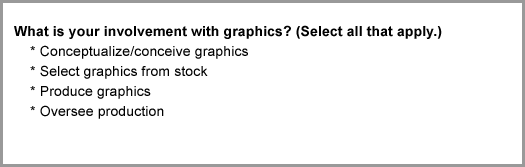
Example 1: This poll (below) identifies where the participants’ “come from.” It helps you see the group makeup and to tweak your message to suit.
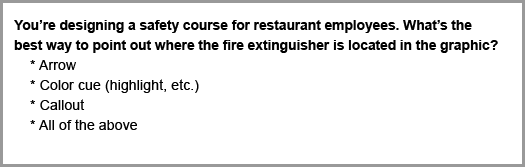
Example 2: This poll (below) is quite challenging. No doubt, learners are creating these visuals in their minds, weighing the options, finally selecting an answer. As a learner, I can hardly wait to find out the right answer to this one. Even better, I know you’re going to explain why!
Listen to a Podcast Interview with Karen.
P.S. You might like some of the posts in the webinar category on my blog. The most recent entries deal with a range of topics (e.g. using animations and webcams), and earlier posts include things like “9 concrete tips to keep people engaged” and “10 tech tips for webinars and online meetings”.
Relevant links (or other comments) are always welcome!
Thanks for that input Jennifer. Was this mobile polling? Do you have a tool to recommend?
I so far have had great experience using polling. Being on the participant side … it keeps me engaged with the webinar. The facilatator was realy good in keeping the momentum going while folks are taking the very quick poll …. and I will say that the meeting room in all occasions I’ve taking the poll has had very large numbers of participant … in 3 digits.
Thanks for the great feedback, Craig.
Thanks for sharing Karen’s thoughts, Connie. I really like her tip about planning to answer questions at specific times.
In general though, I find polling questions aren’t used well, because they don’t tend to help the audience much – if at all. Yet the process takes a long time, so it’s frustrating.
That’s why with a question like your 1st example (“What’s your involvement with graphics?”), I suggest asking it during registration, rather than live. Then you can more easily structure your talk to suit the responses.
I think your 2nd example is much more engaging, because it tests each person’s knowledge of the topic. So it could be a good way to introduce an idea (like in elearning too), rather than just “lecturing” without making the audience think for themselves.
Lastly, here’s an idea for what I call “maybe the best polling question ever.” I’d love to hear your thoughts on it.
Looks like you’ve got some great resources for webinar best practices there. Thanks for letting us know, Sarah.
These are super tips. I’ve just conducted a comprehensive overview of “webinar best practices” resources that I’ve published on my blog (Exceptional Resources: Webinar Best Practices Worldwide http://www.exceptionalwebinars.com/?p=133. I’ve featured your article in the top 3 resources and linked back to the original article, giving you full credit for your work.Thank you for this top-quality article.